Charging Port
Chapter 4 · Manual page 147
The charging ports configured in different countries and regions may vary. Charging port type 1:
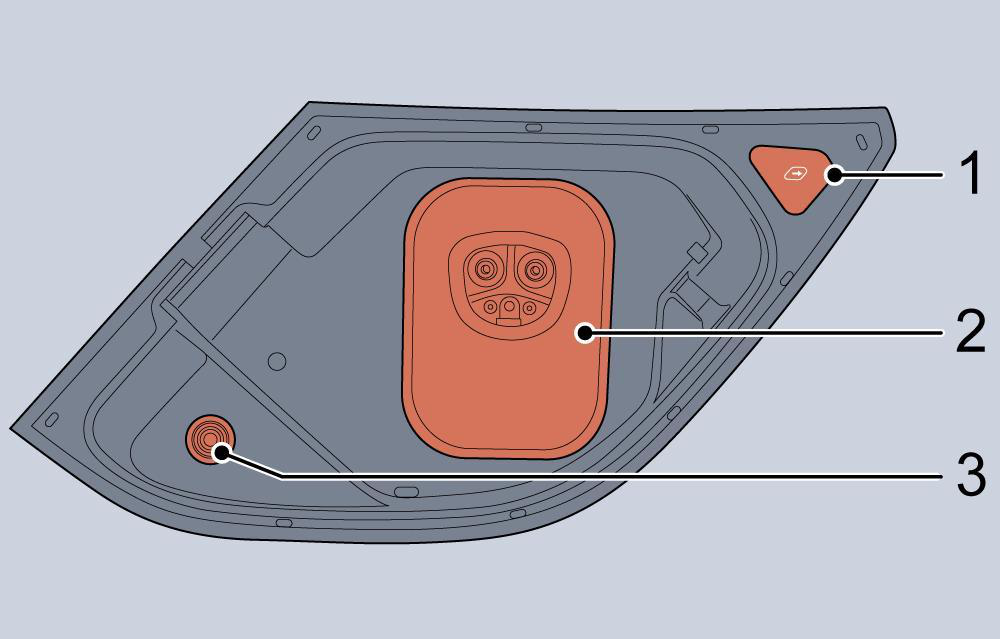
- Charging port door switch
- Slow&Fast charging port
- Charging state indicator
- White - Welcome
- Blue - Charging cable connected
- Orange - Charging cable not connected
- Green - Charging normal
- Red - Charging failure
Charging port type 2:
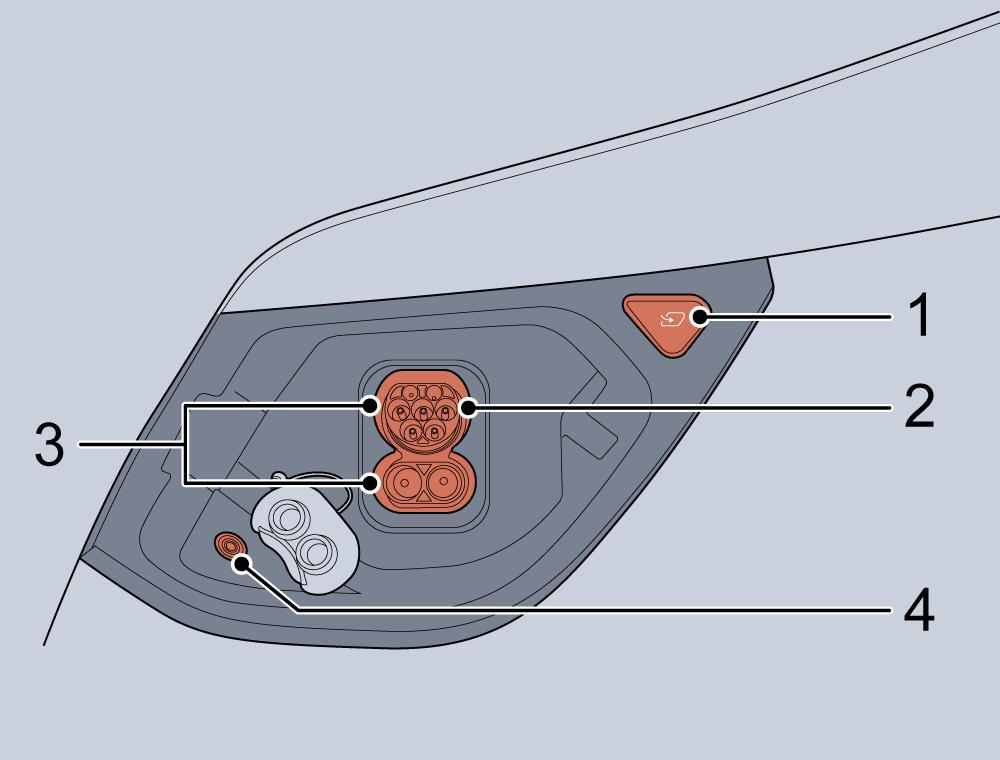
- Charging port door switch
- Slow charging port
- Fast charging port
- Charging state indicator
- White - Welcome
- Blue - Charging cable connected
- Orange - Charging cable not connected
- Green - Charging normal
- Red - Charging failure Note: When the vehicle discharges externally, the indicator will be in a blue breathing state. Precautions for AC or DC charging After opening the charging port door, check the charging identifier symbol on the plug cover. Check the charging connector identifier symbol on the AC or DC charger cable. After checking that the alphabetic characters of the charging identifier symbols match, proceed the next charging step.
Risk of failure, fire or injury etc. when using a charging connector with unmatched identifier symbols.
Electric charging identifier label symbol table Type of Supply Type Configuration Accessory Voltage range Identifier
| AC | Vehicle connector and vehicle inlet | ≤480V |  | |
|---|---|---|---|---|
| DC | 7P+2P 7P+2P | Vehicle connector and vehicle inlet | 50V–500V |   |
| DC | Vehicle connector and vehicle inlet | ≤1000V | ||
| Opening the charging port door | ||||
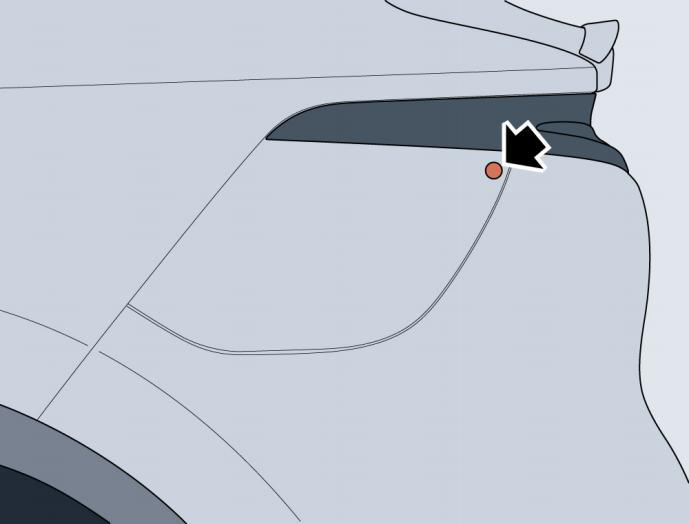
| The charging port door is on the rear left of the vehicle, and can be opened using any of the following methods: |
- When the vehicle is unlocked, if the user presses the upper right area of the charging port door (as shown in the figure below), the charging port door will automatically open;
- The charging port door can be opened by pressing the charge port door in the 3D image displayed on the central screen.
When the charging port door is open, the slow charging port and fast charging port are visible.
Note: If the charging port door is frozen and cannot open automatically, it will be necessary to manually break the ice or open the door
after the ice melts. Do not attempt to open the door using force, this will cause damage.
Note: Do not wash with the charging port door open.
Note: When the battery is low or disconnected, do not frequently open and close the charging port door manually to avoid damaging the
internal mechanism.
Note: Do not directly spray high pressure water onto the charge port or door.
Note: The vehicle charging port is provided with a waterproof cover. Please install the waterproof cover in place after the completion of
charge.
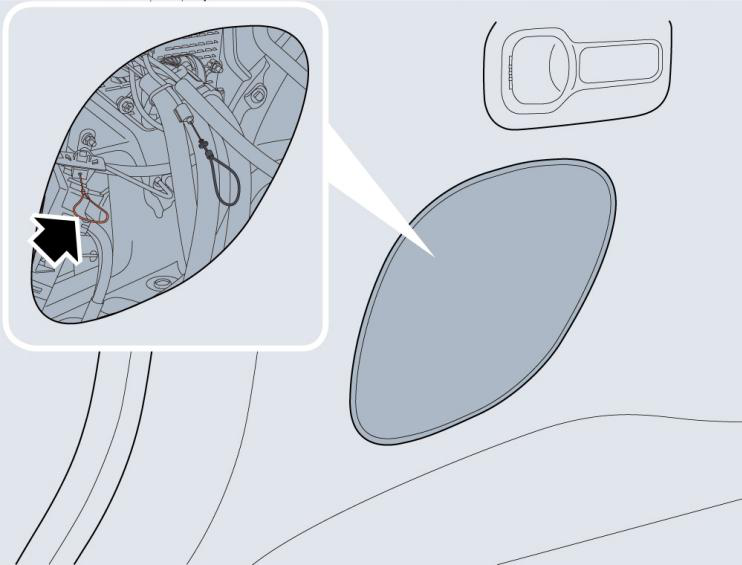
Charging port door opening in emergency
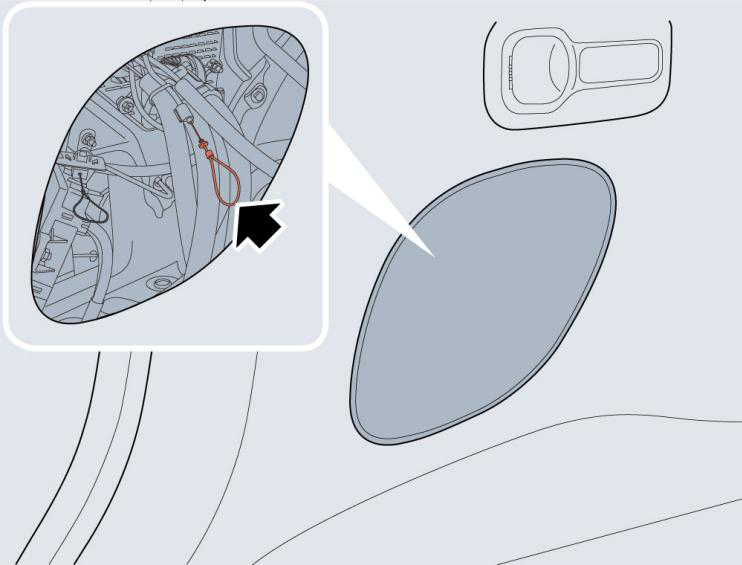
With the vehicle unlocked, if the charging port door cannot be opened normally when it is pressed, you can open it by pulling emergency
charge door opening cable. To gain access to the cable, remove the access port trim cover panel on the left side of the loadspace to expose
the looped handle of charging port door release (pull ring - orange).
 Close charging port door
After charging, the charging port door can be closed using one of the following methods:
Close charging port door
After charging, the charging port door can be closed using one of the following methods: - After charging, pull out the AC charging gun, the charging port door will automatically close;
- When the vehicle is placed in the READY state, and the charging gun is not connected, the charging port door will automatically close;
- Press the charging port door switch, and the charging port door will close;
- The charging port door can be closed when the charging port door on the 3D model of the vehicle on the central screen is operated.
Note: After the charging port door is opened, if the charging gun is not connected within 2 minutes, the charging port door will
automatically close.
Note: The charging port door will return to the open state if it encounters an obstacle during closing.
Charging port electronic lock
The slow charging port features an electronic lock function. In order to prevent children from contacting the charging gun or accidentally
pulling it out during charging, after plugging the charging gun in the slow charging port, the electronic lock in the slow charging port will
automatically be activated to lock the charge gun in position when certain conditions are met. In this case, do not attempt to remove the
charge gun, forced removal of the charge gun will damage the vehicle. The vehicle must be unlocked before pulling out the charging gun.
Note: After the vehicle is unlocked for approximately 10 seconds, if the charging gun is still plugged into the slow charging port, the
electronic lock will automatically reinstate and lock the charge gun again.
Charging port electronic lock opening in emergency
In cases where the automatic unlock of charging port electronic lock fails, you can release the charge gun locking device by pulling the
release cable. Remove the trim panel cover on the left of the loadspace to expose the release cable for the charging gun (pull ring - black).