A/C Control Interface
Chapter 3 · Manual page 127
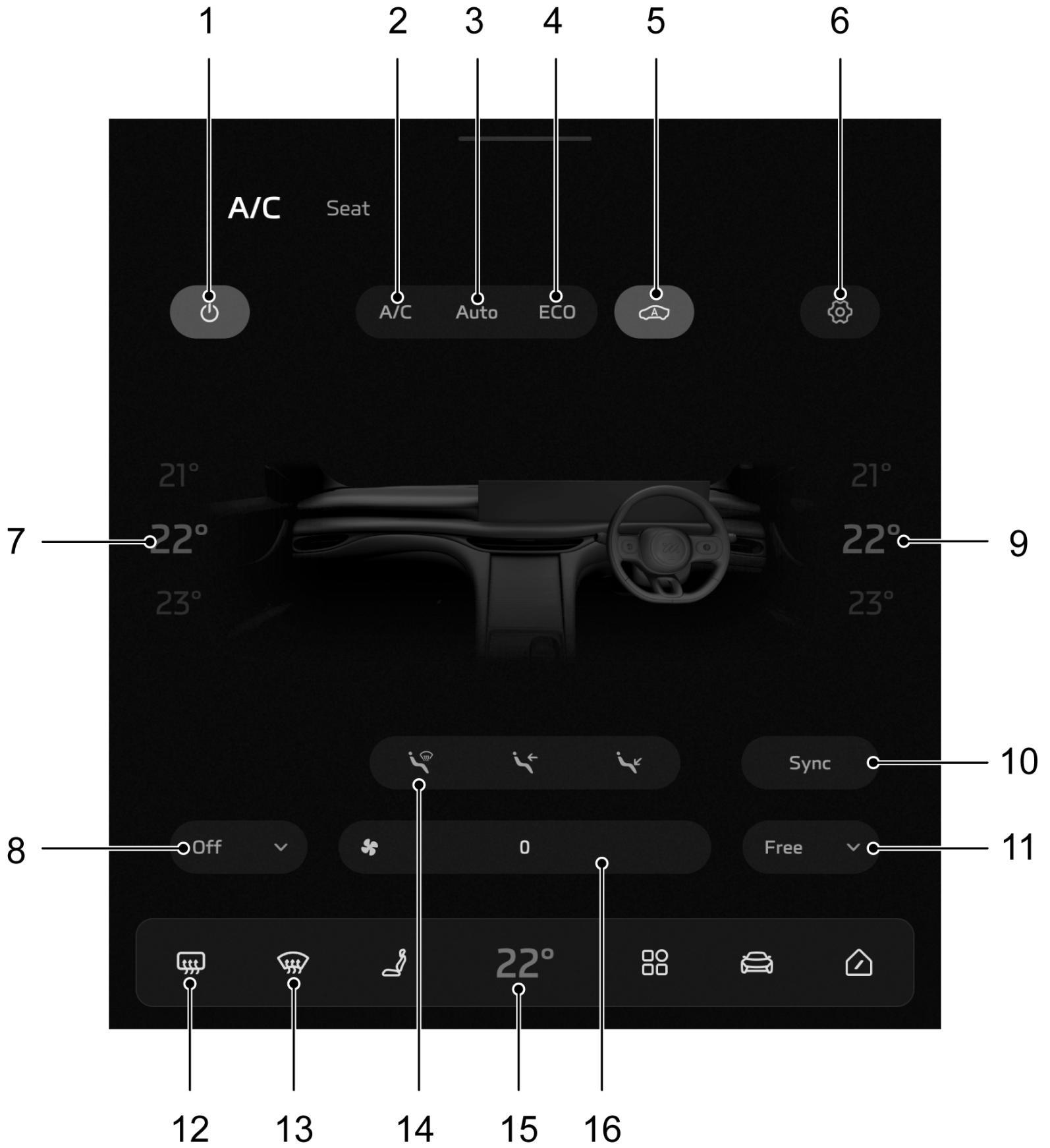
- A/C System Switch
- Cooling/Heating Switch
- Automatic Temperature Control Mode
- Energy-saving Mode
- Air Circulation Mode
- Intelligent Settings
- Front Passenger Temperature Control
- Air Outlet Mode - Front Passenger
- Driver Temperature Control
- Synchronous Temperature Zone Control
- Air Outlet Mode - Driver
- Rear Windscreen Heating
- Front Windscreen Defrost/Defog
- Air Distribution Mode
- A/C Interface Display Button
- Blower Speed Control A/C System Switch Touch the A/C System Switch to switch the A/C system on or off. Cooling/Heating Switch When touching the Cooling/Heating Switch, the A/C system will switch between the cooling/heating function. Automatic Temperature Control Mode Pressing the automatic temperature control mode touch button will turn on the automatic temperature control function and allow the desired target temperature to be set, the A/C system will automatically adjust the air distribution mode, blower speed, etc. to reach and maintain the set temperature.
In order to ensure normal operation of the automatic temperature control function, all windows and sunroof should be closed, the air inlets should not be obstructed, and the automatic temperature control sensor should not be covered.
The vehicle will initiate the automatic mold prevention function of the A/C after the A/C system is switched off in order to avoid smells and odors.
Energy-saving Mode The A/C operates at low energy consumption in the saving mode to extend the driving range, and the cooling/heating effect is reduced to a certain extent.
Air Circulation Mode Touch the Air Circulation Mode Touch Button to switch the air circulation modes.
 During internal recirculation, the A/C system circulates the air in the vehicle to achieve rapid cooling or heating, and prevent any dirty air from outside the vehicle from entering the vehicle.
 During external circulation, the A/C system circulates the air from inside and outside the vehicle to ensure a constant supply of fresh air from the outside.
 During automatic circulation, the A/C system automatically adjusts internal or external circulation according to the actual situation.
Continuous internal circulation may cause the windscreen to mist. If this happens, switch on the defrost/demist function.
Intelligent Settings The maximum heating/cooling function of the A/C can be set to ON automatically when the temperature is too low or too high. Temperature Control Touch the driver/passenger temperature selection icon to adjust the temperature of the air supplied by the vents. Synchronous Temperature Zone Control When touching the Sync Control Touch Button, the button illuminates, the drivers and passengers zone temperatures can be adjusted synchronously by the driver. When the touch button extinguishes, the individual drivers and passenger zone temperatures can be adjusted separately. Front Face Vent Adjustment The driver and the passenger are able to adjust the front face vent on the corresponding side. The passenger face vent is automatically opened or closed depending on whether the passenger seat is occupied. The front face vent adjustment includes the following five functions: Press the “Free” touch button; the vent mode is automatically selected for the front face vent. Press the “Off” touch button to open or close the front face vent. Press the “Sweep” touch button; the front face vent enters the sweep mode. Press the “Wind 1” and “Wind 2” touch button; the front face vent enters a predefined mode. Swipe the front face vent airflow icon on the corresponding side left or right to adjust the direction of the front face vent. Air Distribution Mode To “Windscreen”, directs air to the windscreen and front window side vents; To “Face”, directs air to the face vents; To “Footwell”, directs air to the footwell vents;
When manually selecting multiple ventilation modes, three modes can be selected for use; in the automatic temperature control mode, the A/C system will automatically assign the ventilation mode, and the ventilation mode on the A/C interface will be grayed out.
Blower Speed Control Touch the blower speed control icon to adjust the A/C blower speed and air volume. Front Windscreen Defrost/Demist Press the Defrost/Demist Button, the Cooling/Heating On/Off button will illuminate, and the system will enable the Defrost/Demist function to clear the mist or frost on the windscreen and front windows. Pressing the Defrost/Demist Button again will exit the defrost/demist function, and the system will return to the previous state. In the defrost/demist mode, operation of air distribution mode will exit the defrost/demist mode. Rear Screen Heating
The heating element of the rear window is a sensitive component, and can be easily damaged when used improperly. DO NOT scrape or scratch the inside of the glass. DO NOT stick labels over the heating elements.
Press the heated rear window button to the heated rear window on or off. It is on when the button indicator illuminates and off when the button indicator goes out. After the heated rear window function is turned on, it will automatically switch off after running for a certain period of time.