Windscreen Wiper
Chapter 2 · Manual page 53
When the vehicle is powered on, operate the lever to select different wipe modes.
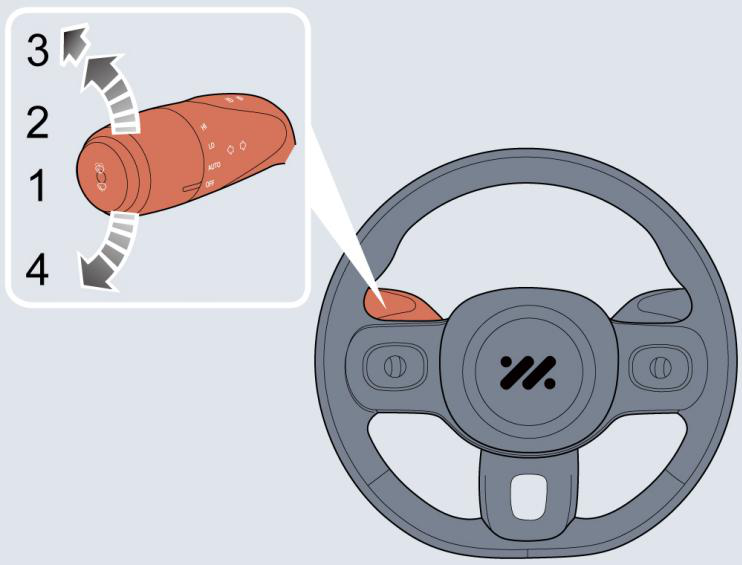 Indication of displayed position
 : Automatic wipe
 : Slow speed wipe
 : Fast speed wipe
 : Wipe off (default position)
Automatic wipe
By turning the lever to automatic wipe (1), the wipers will operate automatically. Select the sensitivity adjustment level on the central
screen to adjust the wiper delay interval.
A rain sensor is fitted in the interior rearview mirror base to detect varying amounts of water outside of the windscreen. With automatic
wipe, the vehicle will adjust the wiping delay interval according to the signals provided by rain sensor.
Note: If the sensitivity level of the rain sensor is increased, the wiper will automatically wipe once; If the rain sensor detects continual
rain, the wiper will keep working. In conditions where there is no rain, it is recommended to switch off automatic wipe.
Slow speed wipe By turning the lever to the slow speed wipe (2), the wipers will operate slowly. Fast speed wipe By turning the lever to the fast speed wipe (3), the wipers will operate at a fast speed. Note: If the wipers are set to fast speed some intelligent driving functions (ACC/ Pilot) cannot be activated, or some intelligent driving functions may be suspended. Wipe off By turning the lever to OFF (4) to turn off the wipe switch, the wipers will stop wiping and return to the park position. Note: When the vehicle is stationary, if the bonnet is opened, the front wiper will stop working immediately.
: Wipe off (default position)
Automatic wipe
By turning the lever to automatic wipe (1), the wipers will operate automatically. Select the sensitivity adjustment level on the central
screen to adjust the wiper delay interval.
A rain sensor is fitted in the interior rearview mirror base to detect varying amounts of water outside of the windscreen. With automatic
wipe, the vehicle will adjust the wiping delay interval according to the signals provided by rain sensor.
Note: If the sensitivity level of the rain sensor is increased, the wiper will automatically wipe once; If the rain sensor detects continual
rain, the wiper will keep working. In conditions where there is no rain, it is recommended to switch off automatic wipe.
Slow speed wipe By turning the lever to the slow speed wipe (2), the wipers will operate slowly. Fast speed wipe By turning the lever to the fast speed wipe (3), the wipers will operate at a fast speed. Note: If the wipers are set to fast speed some intelligent driving functions (ACC/ Pilot) cannot be activated, or some intelligent driving functions may be suspended. Wipe off By turning the lever to OFF (4) to turn off the wipe switch, the wipers will stop wiping and return to the park position. Note: When the vehicle is stationary, if the bonnet is opened, the front wiper will stop working immediately.
- Avoid operating the wipers on a dry windscreen.
- In freezing or extremely hot conditions, make sure that the wiper blades are not frozen or adhered to the windscreen.
- If the wiper or windscreen are covered with snow or other debris, please clear the wiper blades and operational area before use.